Designing PSI.SG

jasonleow • 14 Oct 2023 •
Here’s how I designed, developed and marketed my haze app PSI.SG.
Encountering the problem
The haze in Singapore recently got really bad again. But I found the PSI and PM2.5 readings were not always clear – it lacked context and actionable steps. I found myself asking some recurring questions:
What did the numbers and terms actually mean?
How do I use the different readings for my daily life?
What can I do to protect myself and my loved ones?
Finding the information often meant having to triangulate across different parts of the site, or even across the different NEA resources - the mobile app, a website, a PDF.
I was using haze.gov.sg but the key info are fragmented across the page. I see a number but have to scroll down to the embedded PDF, check the legend, to read what the advisory is. Then there’s terms like “reduce” vs “minimise” vs “avoid”, which is confusing and there’s a tiny footnote that explains the difference… So there’s quite some hoops to jump through to get what I need. Yes it’s all one one web page, but who has the time to treasure hunt them down every time. This is one reason why this reddit post on r/singapore “Guide: How to make sense of NEA 24h PSI/1h PM2.5 vs AQI PM2.5 readings” had to be written, because it’s not clear and intuitive. Besides, there’s also a lot of information on the page that I don’t need – maps, charts, trends, technical terms and units. Other popular sites like AQI has similar issues too with display of information.

While outside, I use the NEA mobile app, but there’s a lot of data I don’t need, for example, the map, the unit measurements, the banding. I don’t need to know it’s Band 1 or Band 2. I just want the reading and below it, what to do. The health advisory shown on the app is also for the 24h PSI, but I’m outside trying to make decisions right now, so I want to see the health advisory for the hourly PM2.5 reading (which is what NEA advises on the haze.gov.sg app itself)…but that’s not available on the app so I got to triangulate with the website.
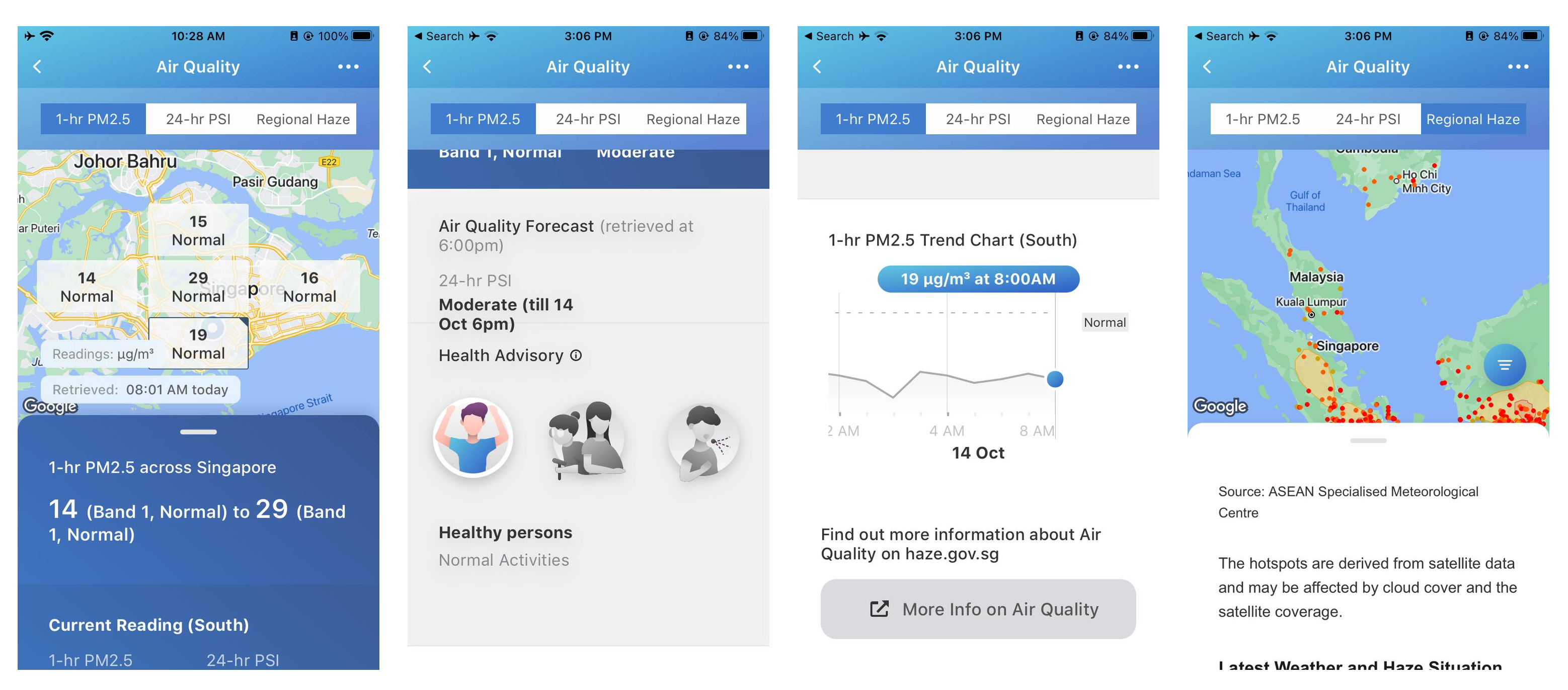
There’s isn’t an all-in-one snapshot of all the key information that I specifically need as an individual to make decisions when living with the haze.
So I thought I can build a UI wrapper for all this, combine only the data I need, remove the data I don’t need, synthesize them in a way that’s faster and easier to scan.
Caveat though: I’m not finding fault with NEA or the government. They probably got their work cut out for them as they have to serve a diverse set of citizens and stakeholders, maybe even businesses who depend on the PSI readings. It could explain why the information is comprehensive and covers everything. It has to, due to them being government. So that’s where the opportunity for redesign is for normal citizens like me. I just need something that serves my daily needs (and a subset of Singapore population similar to me).
Designing the solution
So I envisioned the web app had to be a simple, clean interface that’s intentionally lacking details. Details that are not useful or practical in helping us make decisions in our daily lives. And it’s prioritised for glanceability.
This is what it ended up looking like:

Why it’s the way it looks:
- Translation in 3 other languages – this is an inclusive design feature, for seniors or folks who prefer to see this in their native tongue. The haze affects the 100%, not just folks who know English.
- PM2.5-first – I put the PM2.5 index first because that’s the most pragmatic reading for daily life. when I’m deciding to go for a job, I read that. The PSI reading is a 24h average, more useful for forecasting activities for the next day. So people can tap on the button to see it.
- Glanceability – The background colour for PSI readings mirrors the colour banding that NEA uses. There’s no colour banding for PM2.5 (NEA uses some dull shade of grey/purple), so I created my own. This is to help us scan quickly to decide if we need to read more. Green or blue, I don’t need to read more details, I glance at the colour and then leave. Yellow, orange or red, okay you got my attention, I need to read more about the health advisory.
- Regional reading – National readings aren’t super useful, because wind conditions can vary per region and it can be bad in the east side while the west is fresh. So for the PM2.5, the app shows readings per region. Default number shows Central region, but if you tap on East, it will switch out the primary number to the reading for east side and stay persistent, even if you close the browser and return to it later. It saves your last seen region. I needed this because I’m mostly in the east side and just interested in that.
- Updated at date time – This is for legitimacy. Is the reading updated? When was it last updated? Showing the date and time of the last update is assuring.
- How to use this reading – When researching for the app, I realised I’ve been reading the numbers all wrong. PM2.5 is for immediate use, PSI is to forecast for tomorrow. I never knew that! That’s why I added a info box showing how to use the number. That’s why the app shows the PM2.5 reading as default.
- What you can do – Next most important thing is the health advisory on what to do to protect myself from the haze. I edited the NEA advisory to be clearer, more succinct. I removed the confusing terms like “reduce”, “minimise”, “avoid”, and rephrased them by including the footnotes that explains the difference.
For example, NEA’s advisory is “Reduce strenuous outdoor activity for the next hour. Vulnerable persons – avoid strenuous outdoor activity for the next hour.” The explanatory notes say reduce = do less, avoid = do not do. So I combined it say so directly “Do less strenuous outdoor activity for the next hour. Vulnerable persons – Do not do any strenuous outdoor activity for the next hour.” Clearer, isn’t it?! - Web app – The app can be saved like an app icon on your smartphone home screen. One less app to install! This also saves maintenance effort on my part.
- Domain name – Probably the best feature of the web app! Available 3-letter domain names are a rare find on the internet, so I was surprised when it was available. Something plain, direct and descriptive like psi.sg shows clearly what it says it is without needing much explanation. And it’s easy to remember!
Building the solution
When I saw that NEA and data.gov.sg provides an API endpoint with the PSI and PM2.5 data, I knew this could be built relatively easily. I just needed to fetch the data, and display it on a frontend.
I was inspired by the idea and quickly built this in 2 days, using a dead simple tech stack I was familiar with:
- Vue.js for interactivity
- plain CSS, no libraries for styling
- 1 single index.html repository on Github
- Netlify for web hosting
There’s a deep joy to not having to open terminal for this. Just edit on Github, and push to production directly. Blisssss… wish every indie project can be this s.i.m.p.l.e.
I tried using Geolocation API in Javascript for detecting the region that a user might be in, but bumped into issues about privacy and how location tracking might be switched off by default in many people’s browsers, so I chose not to build that in. Right now it just ‘remembers’ your last seen region and stays there for convenience (e.g. I tend to just check East only).
Sharing and ‘marketing’
Marketing is in single quotes because this web app is free and for social good. I’m not looking to monetize this, but I recognise even free apps need marketing and distribution to achieve its mission of helping others. So I launched it on Reddit in r/singapore, and in a few niche communities like Lion City Makers, Better.sg, DesignSG and DevSG. Got some nice feedback, the app seems generally well-received.
It’s been a while since I shipped a full product, and even longer since shipping a tech for good one. It sure feels good to work out those building and shipping muscles!
Comments
@drodol Haha you got this! 💪 I’m sure once you settled down in your new place you’ll be shipping 🔥
That’s a fine-looking app. This is probably my US-centric bias showing, but I hope you have space for some legal disclaimers. You know… information only… not health advice… confirm with your doctor, etc.

@Winkletter Thanks dude! That maybe less of a requirement here in Singapore, but tangentially still good point, I should at least put it somewhere that the data is from a legit government source.
I need some of your impetus to rub off on me!